





7 Construction ERP Software Options for UAE Contractors (2026)


The review covers the following software products and versions:
-
FirstBit ERP Contracting 2.11.36.2
-
Microsoft Dynamics 365: Business Central version 29, Finance 10.0.49, and Project Operations
-
Sage 300 CRE 26.1
-
Oracle Construction and Engineering Cloud: Aconex, Primavera Cloud, and Primavera Unifier 26
-
Acumatica Construction Edition 2026 R2
-
CMiC Construction ERP, including CONSTRUCT apps
-
RIB BuildSmart
We selected these solutions based on their construction-specific capabilities, relevance to UAE/GCC contractors, and verifiable data. Our sources include official vendor documentation, published pricing models, UAE partner portals, and regulatory publications from the FTA and MOHRE, all reviewed as of October 2026.
This analysis was prepared by First Bit’s construction ERP team, drawing on over a decade of ERP implementation experience in the UAE and ongoing work with contractors across the GCC.
What Is Construction ERP Software?

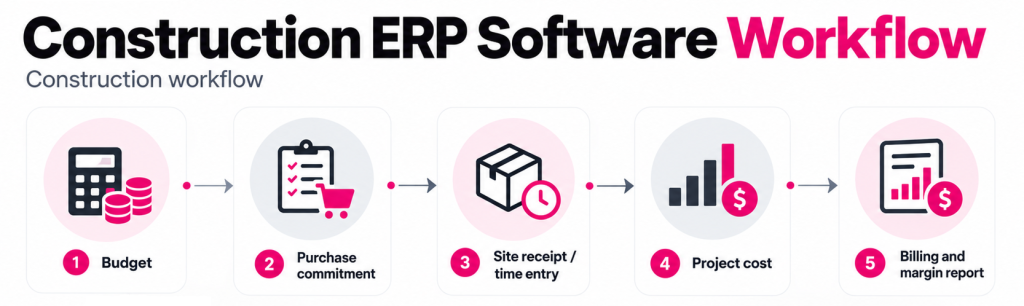
Construction ERP Platforms Compared in 2026
| ERP / Version | UAE localization | Construction core workflows |
| FirstBit ERP Contracting 2.11.36.2 | UAE VAT, WPS, corporate tax, gratuity, Arabic/English, e-invoicing via ASP partners | BOQ, estimates, job costing, procurement, subcontractors, WIP, IPC/progress billing, retention, inventory |
| Microsoft Dynamics 365 Business Central 29, Finance 10.0.49, Project Operations | Business Central: partner-led; Finance: UAE VAT standard; WPS, payroll, Arabic, e-invoicing via partner and independent software vendor extensions |
Project budgets, costing, procurement, subcontracts, progress billing, retention; BOQ via construction extensions |
| Sage 300 CRE 26.1 |
No UAE localization (North American product); VAT, WPS, Arabic, and e-invoicing need custom work |
Job costing, estimating, commitments, subcontracting, change orders, progress billing with retainage, equipment |
| Oracle Construction & Engineering Cloud Aconex, Primavera Cloud, Unifier 26 | UAE VAT, e-invoicing, payroll/WPS through separate ERP or integrations | RFIs, submittals, document control, scheduling, cost control, contracts, variations, payment applications, retention, cash flow |
| Acumatica Construction Edition 2026 R2 | Localization via partners; specific functions depend on the chosen partner | Job costing, budgets, commitments, subcontracting, change orders, progress billing, retainage, field operations |
| CMiC Construction ERP + CONSTRUCT | North American product; no specific public information about UAE VAT, WPS, Arabic or e-invoicing | Estimating, job costing, procurement, subcontracting, change orders, progress billing, retainage, equipment, field workflows |
| RIB BuildSmart | Dubai office; no specific public information about UAE VAT, WPS/payroll, e-invoicing | BOQ-linked cost control (via Candy), procurement, subcontractors, retention releases, plant, valuations, project accounting |
Construction ERP Software Compared in 2026
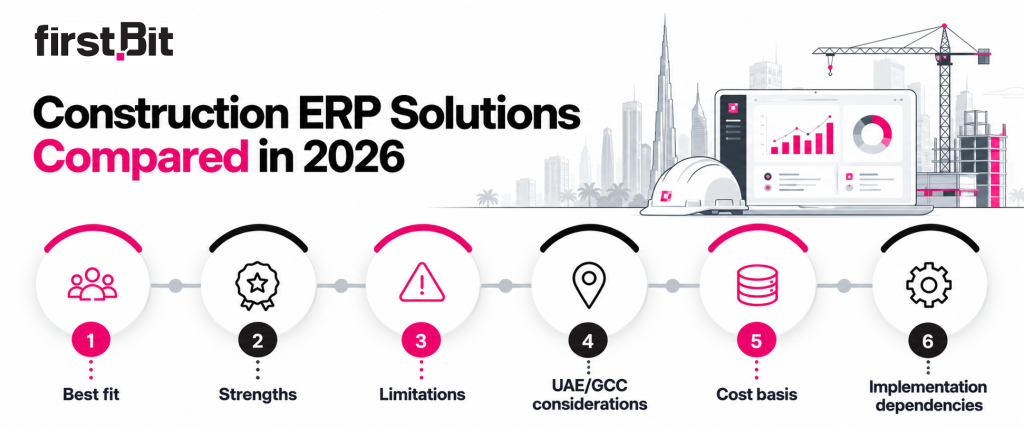
- Best fit. The type and size of construction business each ERP serves best. We consider company size, project complexity, and operational needs, such as job costing for mid-sized UAE general contractors.
- Strengths. Two or three key advantages that make the software stand out. These may include BOQ management, project cost tracking, procurement, subcontractor management, or financial reporting.
- Limitations. One or two important drawbacks or situations where the system may not be suitable. These may include complex configuration, limited construction-specific features, or high implementation requirements.
- Local considerations (UAE/GCC). Support for UAE VAT, the Wage Protection System (WPS), Arabic interfaces, and regional business requirements. We classify local capabilities as native, requires partner, limited, or unverified, based on how they are delivered and the available evidence.
- Cost basis. How pricing is structured, such as per-user subscriptions, module-based licensing, or custom enterprise quotes. Exact prices are included only when publicly available from official vendor sources.
- Implementation dependencies. The expected complexity of deployment, including data migration, system configuration, integrations, employee training, and reliance on implementation partners.
FirstBit ERP
-
Best fit: Mid-to-large UAE general and specialty contractors needing integrated financial and operational control across multiple projects.
-
Strengths: Strong construction cash-flow and profitability control, with project-level cash-flow forecasting, progress billing, retention tracking, budget-versus-actual costing, and project P&L. Integrated procurement, material and equipment tracking, and variation order management. Native UAE tax and payroll compliance.
-
Limitations: Given its features, the ERP system may be excessive for very small firms that require only basic bookkeeping. Specialized integrations and reporting features may require customization.
-
Local considerations (UAE/GCC): Native (UAE). Built-in VAT, corporate tax, WPS payroll, and Arabic-English interface. E-invoicing is available through Accredited Service Providers (ASPs).
-
Cost basis: Custom subscription based on users and deployment, with core modules included. Implementation priced separately.
-
Implementation dependencies: FirstBit ERP offers a guided, phased rollout that includes workflow assessment, configuration, data migration, role-based training, go-live reconciliation, and dedicated post-launch support. Key success factors include clean opening data, clear approval rules, and active involvement from both finance and site teams.
Microsoft Dynamics 365
-
Best fit: UAE contractors who have already invested in the Microsoft ecosystem, especially diversified or multi-entity businesses that require flexible financial management and are willing to use partner-built construction modules.
-
Strengths: Strong financial management, project costing, and WIP accounting; integrated subcontracting and retention in the enterprise configuration; extensive Microsoft integrations and reporting.
-
Limitations: Detailed BOQ tracking, CVR reporting, and site management typically require partner modules. Multiple applications and integrations increase implementation complexity.
-
Local considerations (UAE/GCC): Requires partner (Business Central); limited (Finance). Finance includes UAE VAT reporting, an Arabic interface, and e-invoicing from 1 December 2026; Business Central localization is partner-provided. WPS payroll requires a partner in both.
-
Cost basis: Microsoft publishes US list prices of $80/user/month for Business Central, $210, and $135 for Project Operations ($30/user/month when added to an existing Finance user), billed annually. UAE pricing is quoted in AED by partners. Construction add-ons and implementation are additional.
-
Implementation dependencies: Partner-led implementation includes requirements analysis, selection of construction modules, configuration, integration, data migration, testing, and training. Success depends on agreed cost structures, reliable project data, and coordination between finance, site teams, and the implementation partner.
Sage 300 Construction and Real Estate
-
Best fit: Primarily mid-to-large U.S. and Canadian contractors and real estate developers needing advanced job costing, project accounting, and US and Canadian payroll. Less suitable for UAE contractors due to limited local compliance support.
-
Strengths: Detailed job costing and budget tracking; integrated change orders, subcontractor commitments, progress billing, and retention; strong WIP and profitability reporting.
-
Limitations: Estimating and advanced field operations require separate applications. UAE-specific compliance is neither integrated nor publicly verified.
-
Local considerations (UAE/GCC): Unverified. No verified native UAE VAT reporting, WPS generation, or Arabic interface. Payroll follows US and Canadian rules. Local compliance would require additional solutions or customization.
-
Cost basis: Quote-based subscription depending on selected modules and deployment. Estimating, integrations, and implementation may cost extra. No fixed official public price.
-
Implementation dependencies: Implementation is delivered through Sage partners and their consultants. Implementation involves cost-code configuration, data migration, system integration, testing, and staff training.
Oracle Fusion Cloud ERP and Construction Applications
-
Best fit: Large UAE contractors, developers, and infrastructure owners managing complex projects requiring advanced scheduling, document control, and portfolio-level cost management.
-
Strengths: Advanced scheduling and risk analysis; auditable document workflows; detailed cost forecasting, contract management, and change control.
-
Limitations: Not a complete ERP; accounting and payroll require separate systems. Multiple applications and integrations increase complexity and cost.
-
Local considerations (UAE/GCC): Limited. The construction applications do not provide built-in UAE VAT, e-invoicing, or WPS compliance. These require integration with compliant financial and payroll solutions. Unifier 26 supports an Arabic interface, but Aconex does not.
-
Cost basis: Custom enterprise pricing based on selected applications and licensing scope: Aconex is typically priced by project value, while Primavera Cloud and Unifier are licensed per user and module. Integrations and implementation add costs.
-
Implementation dependencies: Typically led by Oracle or qualified implementation partners with Primavera expertise. It covers workflow configuration, cost structures, schedules, data migration, and integrations. Oracle provides Aconex training and support. Preconfigured Unifier Accelerator can simplify deployment.
Acumatica Construction Edition
-
Best fit: Small-to-mid-sized general contractors and MEP/specialty subcontractors managing multiple jobs and mobile site teams, particularly those needing real-time field-to-office integration with cost tracking.
-
Strengths: Native job costing and WIP accounting; S-curve cost forecasting and quantity-based progress billing; consolidated project reporting and subcontractor collaboration through the Vendor Portal.
-
Limitations: Dedicated CVR reporting is not publicly verified and may require customization. UAE localization and construction-specific partner expertise need confirmation.
-
Local considerations (UAE/GCC): Requires partner / partially unverified. UAE VAT requires local tax configuration; payroll and WPS require partner or third-party solutions, and UAE e-invoicing depends on the partner. Arabic interface translation is supported, but a ready-made Arabic version is unverified.
-
Cost basis: Consumption-based subscription priced by applications, transaction volume, computing resources, and deployment model, with unlimited users. Implementation costs depend on partner scope; UAE pricing requires a quotation.
-
Implementation dependencies: Partner-led setup covering project cost structures, billing workflows, data migration, integrations, testing, and training. Success depends on clean opening budgets, accurate cost codes, and verified UAE compliance workflows.
CMiC
-
Best fit: Large UAE/GCC general contractors and diversified construction groups managing complex projects, multiple entities, extensive subcontracting, and large workforces.
-
Strengths: Unified construction financials, project management, and CONSTRUCT mobile apps; real-time job costing and profitability reporting; integrated subcontractor, equipment, and workforce management.
-
Limitations: Complex implementation may be excessive for smaller contractors. UAE-specific compliance and localized workflows may require customization.
-
Local considerations (UAE/GCC): Limited. Proven UAE deployment at ALEC, including co-developed GCC payroll and e-invoicing support. It’s unverified whether UAE VAT, WPS, and e-invoicing are standard features. Arabic translation is possible on-premises through CMiC’s Translation Manager, which isn’t available to Cloud customers. Ready-made Arabic localization is unconfirmed.
-
Cost basis: Custom quotation based on selected modules, user count, licensing, and deployment scope. Implementation and integrations may cost extra; no fixed public price.
-
Implementation dependencies: Vendor-led implementation covering workflow assessment, cost-code setup, data migration, integrations, testing, and training. Success depends on standardized processes, clean financial data, and active involvement from finance and site teams.
RIB BuildSmart
-
Best fit: General and specialty contractors managing procurement-heavy, labour- and equipment-intensive projects, especially those using RIB Candy for estimating and cost control.
-
Strengths: Real-time committed, accrued, and actual cost tracking; procurement controls against budget allowances; integrated labour, equipment, and subcontractor costing.
-
Limitations: BOQ estimating, scheduling, and advanced project forecasting require the separate RIB Candy product. UAE-specific compliance is not publicly verified.
-
Local considerations (UAE/GCC): Unverified. Proven UAE implementation at Summertown Interiors. Built-in UAE VAT, WPS, e-invoicing, and Arabic interface support remain unconfirmed.
-
Cost basis: Custom subscription pricing per user. RIB Candy licensing and implementation may add costs; no fixed public price.
-
Implementation dependencies: Implementation with RIB training and support, covering workflow assessment, cost-code alignment, procurement setup, data migration, and staff training. Candy integration requires a consistent Bill of quantities (BOQ) and cost structures, with testing and post-launch support.
What Makes a Construction ERP Truly Specialized?
-
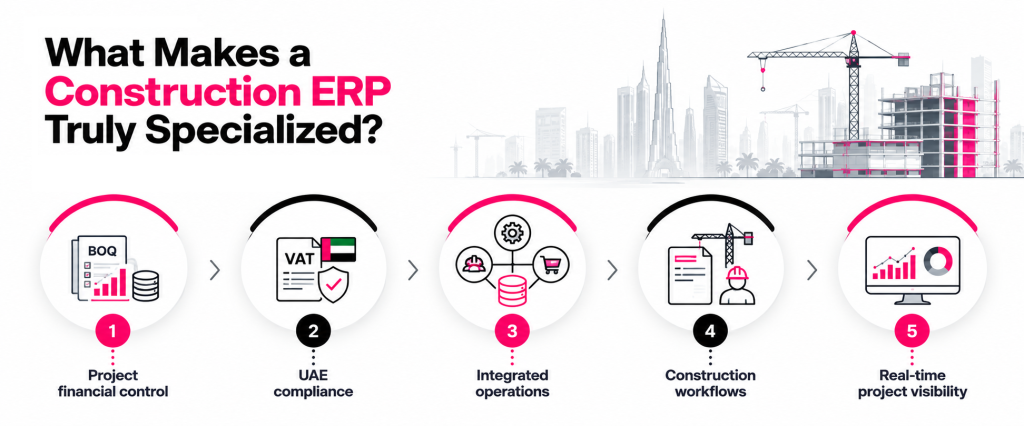
Project financial control. BOQ-based budgeting, WIP reporting/CVR reporting, cash flow forecasting, and project profitability tracking.
-
UAE compliance. VAT reporting, WPS payroll file generation, Arabic-language support, and e-invoicing readiness.
-
Integrated operations. Connected data across project management, construction procurement, site activities, equipment, payroll, and accounting.
-
Construction workflows. Subcontractor management, variation orders, progress billing, retention, and approval processes.
-
Real-time project visibility. Tracking budgets, committed and actual costs, cash flow, and margins across multiple projects.
Construction ERP vs General ERP and Project Management Software
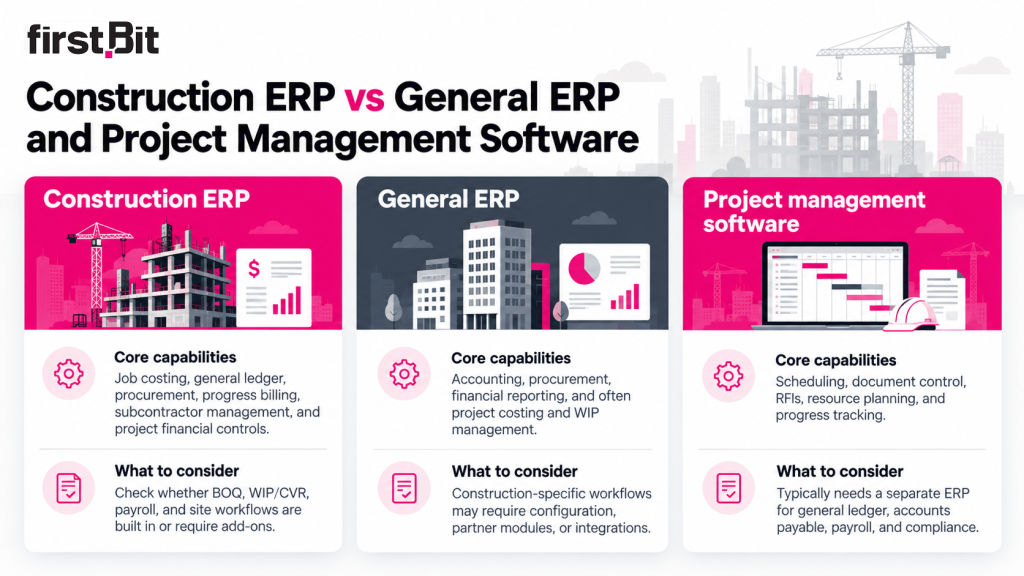
| Software type | Core capabilities | What to consider |
| Construction ERP | Job costing, general ledger, procurement, progress billing, subcontractor management, and project financial controls. | Check whether BOQ, WIP/CVR, payroll, and site workflows are built in or require add-ons. |
| General ERP | Accounting, procurement, financial reporting, and often project costing and WIP management. | Construction-specific workflows may require configuration, partner modules, or integrations. |
| Project management software | Scheduling, document control, RFIs, resource planning, and progress tracking. | Typically needs a separate ERP for general ledger, accounts payable, payroll, and compliance. |
Key Features That a Construction ERP Must Have
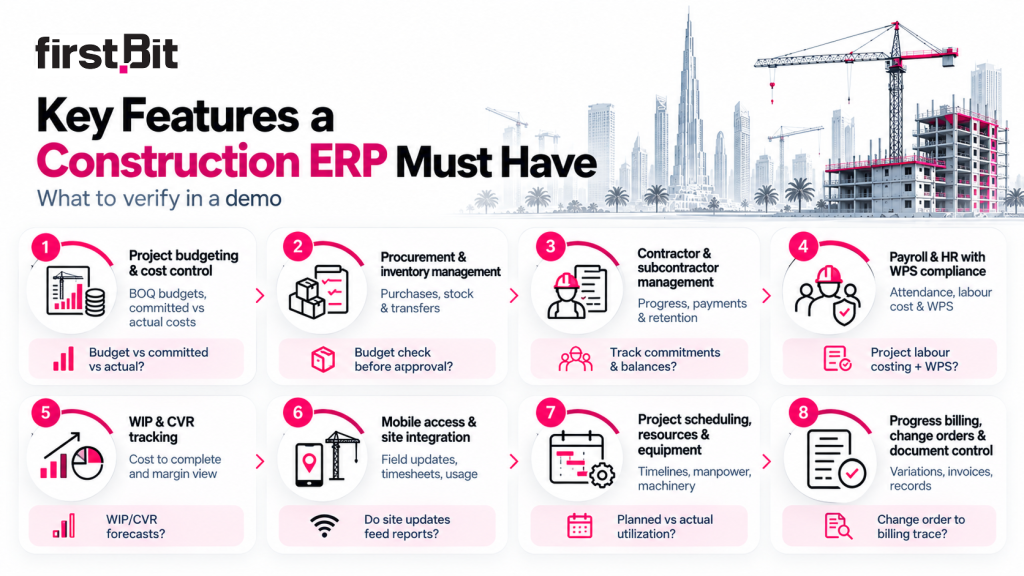
| Key feature | Business outcome | Question to ask in a demo |
| Project budgeting and cost control | Tracks BOQ budgets, committed costs, and actual expenses to identify overruns and protect project margins. | Can we compare budgeted, committed, and actual costs by project and BOQ item? |
| Procurement and inventory management | Controls purchasing, material availability, and stock transfers to reduce overspending and site delays. | Can purchase requests be checked against budgets before approval? |
| Contractor and subcontractor management | Tracks contracts, subcontractor progress, payments, and retention to improve cost control and accountability. | Can we track subcontractor commitments, completed work, and outstanding payments? |
| Payroll and HR with WPS compliance | Connects attendance, overtime, and labour costs with payroll while supporting UAE salary compliance. | Can the system allocate labour costs to projects and generate WPS-compliant salary files? |
| WIP & CVR tracking | Compares work completed, costs incurred, and forecast revenue to identify potential margin losses early. | Can we generate WIP and CVR reports showing projected final costs and margins? |
| Mobile access and site integration | Captures site progress, timesheets, and material usage directly from the field, reducing reporting delays. | Can site teams submit updates that automatically feed into project reports? |
| Project scheduling, resources, and equipment | Coordinates timelines, manpower, and machinery to reduce downtime and resource conflicts. | Can we track planned versus actual progress and equipment utilization across projects? |
| Progress billing, change orders, and document control | Connects completed work, approved variations, invoices, and project documents to improve collections and traceability. | Can we follow a change order from approval to updated costs and client billing? |
What to check beyond the feature list: Ask whether each function is built in, requires configuration, or depends on third-party modules. This helps reveal potential implementation costs, integration requirements, and ongoing maintenance needs.
Project Budgeting and Cost Control
Procurement and Inventory Management
Contractor and Subcontractor Management
Payroll and HR with WPS Compliance
Work in Progress (WIP) and Cost Value Reconciliation (CVR)
Mobile Access and Site Integration
A 2023 Deloitte report found that 83% of construction companies using industry-specific ERP systems reported better financial visibility and faster project execution[?].
Project Scheduling, Resources, and Equipment
Pro tip: During a vendor demo, contractors should verify which functions are built in and which require integration with specialized planning tools. You should especially pay attention to scheduling, fleet management, resource planning, and equipment management functions.
It’s best to also check whether schedule changes and resource usage automatically update project costs and reports.
Progress Billing, Change Orders, and Document Control
Pro tip: During a vendor demo, contractors should check whether approved variations automatically update billing and reporting, and whether supporting documents can be traced from initial request to final approval.
Construction ERP Cost Factors and Total Cost of Ownership
-
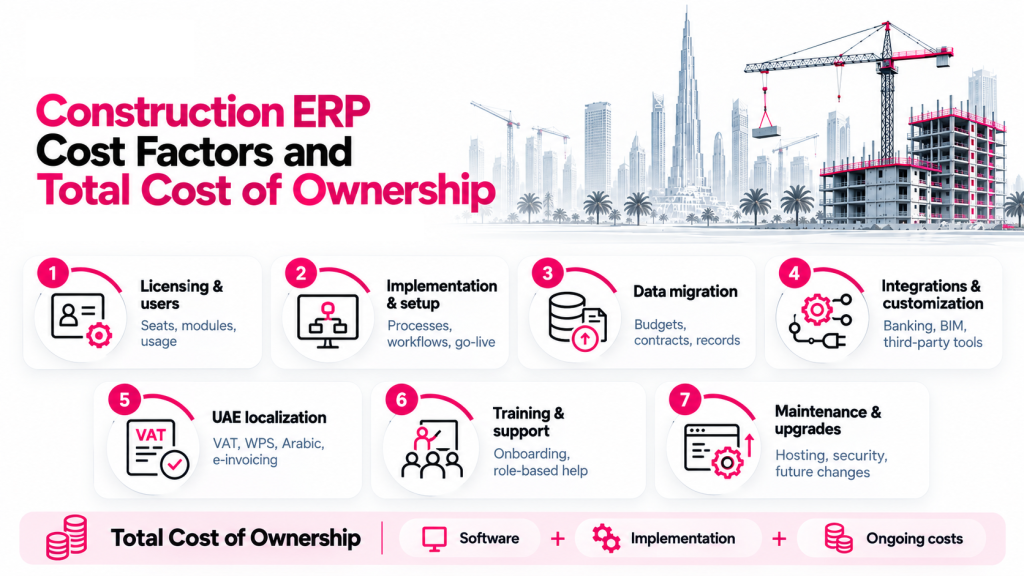
Licensing model and users. Costs may depend on named users, concurrent users, selected modules, or system usage. Cloud subscriptions involve recurring fees, while on-premises deployments may require upfront licensing and infrastructure investments.
-
Implementation and configuration. Business process analysis, project cost structures, approval workflows, testing, and go-live assistance affect initial costs.
-
Data migration. Transferring project budgets, contracts, financial records, and inventory data requires preparation, validation, and reconciliation.
-
Integrations and customization. Connecting accounting, banking, BIM, scheduling, or third-party applications can increase development and maintenance expenses.
-
UAE localization: VAT reporting, WPS payroll, e-invoicing, and Arabic-language requirements may be built in or require additional configuration and integrations.
- Training and support. Staff onboarding, role-based training, technical assistance, and post-launch optimization should be included in the budget.
-
Maintenance and upgrades. Software updates, cloud hosting, security, additional modules, and future customizations can affect recurring costs.
When requesting quotations, separate one-time implementation costs from recurring subscription and support fees. Ask vendors to specify included modules, user limits, integrations, training, upgrades, and any additional charges.
Comparing the total cost of ownership over three to five years, rather than the initial software price alone, provides a more realistic view of affordability and long-term value.
How to Evaluate Construction ERP Platforms
-
End-to-end workflows. Follow a project from BOQ budgeting and procurement through actual costs, variations, progress billing, and profitability reporting.
-
Financial reporting. Test whether WIP, CVR, committed costs, and cash-flow forecasts can be generated and adjusted without spreadsheets.
-
Integrations. Check how site updates, attendance, payroll, procurement, and accounting exchange data without duplicate entry.
-
User roles. Have project managers, site supervisors, procurement staff, and finance teams complete their daily tasks.
-
UAE compliance. Demonstrate VAT reporting, WPS file generation, and Arabic workflows where required.
-
Acceptance criteria. Define expected results, approval controls, reporting accuracy, and acceptable manual steps before the demo
Contractors often find software limitations during evaluation.
For example, ALEC, a Dubai contractor owned by the Investment Corporation of Dubai, evaluated several ERP systems before replacing its legacy platform. Henry Loubser, ALEC's ERP Manager, explained that limitations in the old system had forced the company to rely on multiple standalone applications.
Eventually, ALEC selected a new construction ERP system — CMiC. However, it required additional development. ALEC and CMiC co-developed GCC-specific functions, including localized payroll, subcontractor compliance checks, advance payment controls, and subcontractor contra charges. They also addressed emerging e-invoicing requirements.
1. Define Project-Specific Goals
-
Reducing the project cost reporting time
-
Speeding up approvals
-
Lowering the number of manual payroll corrections
2. Map Your Workflows
-
Site material request
-
Purchase approval
-
Delivery
-
Invoice processing
-
Project cost reporting
3. Involve Field and Finance Teams
4. Check for Industry-Focused Tools
5. Assess Regional Compliance Support
6. Evaluate Scalability and Support
According to McKinsey, adopting digital tools like ERP can improve productivity by 15% and reduce costs by up to 6%[?].
Final Thoughts
Frequently Asked Questions
1. Which ERP is best for small and mid-sized construction companies?
2. Can a general ERP work for construction companies with additional modules?
3. What is the difference between construction ERP and project management software?
4. What UAE requirements should contractors verify before choosing ERP software?
5. How long does construction ERP implementation take?

'%3e%3cg%20clip-path='url(%23clip1_6548_6055)'%3e%3cpath%20d='M13.974%2015.6195C14.2724%2016.0185%2014.6532%2016.3487%2015.0905%2016.5876C15.5278%2016.8265%2016.0114%2016.9686%2016.5084%2017.0042C17.0055%2017.0398%2017.5043%2016.9681%2017.9712%2016.7939C18.4381%2016.6198%2018.8621%2016.3472%2019.2143%2015.9948L21.2994%2013.9098C21.9324%2013.2544%2022.2827%2012.3766%2022.2747%2011.4654C22.2668%2010.5543%2021.9014%209.68269%2021.257%209.03839C20.6127%208.39408%2019.7412%208.02862%2018.83%208.0207C17.9189%208.01278%2017.0411%208.36305%2016.3857%208.99606L15.1902%2010.1845M16.754%2014.2295C16.4555%2013.8305%2016.0747%2013.5003%2015.6374%2013.2614C15.2002%2013.0225%2014.7166%2012.8804%2014.2196%2012.8448C13.7225%2012.8092%2013.2237%2012.8809%2012.7568%2013.0551C12.2899%2013.2292%2011.8659%2013.5018%2011.5136%2013.8542L9.42861%2015.9392C8.7956%2016.5946%208.44534%2017.4724%208.45326%2018.3836C8.46117%2019.2947%208.82664%2020.1663%209.47094%2020.8106C10.1152%2021.4549%2010.9868%2021.8204%2011.898%2021.8283C12.8091%2021.8362%2013.6869%2021.4859%2014.3423%2020.8529L15.5308%2019.6645'%20stroke='%235F7896'%20stroke-width='1.39002'%20stroke-linecap='round'%20stroke-linejoin='round'/%3e%3c/g%3e%3c/g%3e%3crect%20x='0.438953'%20y='0.438953'%20width='28.9709'%20height='28.9709'%20rx='14.4855'%20stroke='%235F7896'%20stroke-width='0.877907'/%3e%3cdefs%3e%3cclipPath%20id='clip0_6548_6055'%3e%3crect%20width='29.8488'%20height='29.8488'%20rx='14.9244'%20fill='white'/%3e%3c/clipPath%3e%3cclipPath%20id='clip1_6548_6055'%3e%3crect%20width='16.6802'%20height='16.6802'%20fill='white'%20transform='translate(7.02344%206.58435)'/%3e%3c/clipPath%3e%3c/defs%3e%3c/svg%3e)









See FirstBit ERP solutions in action
After the demo you will get a quotation for your company.